An AI-trained executive assitant can research 50 vendors, summarize findings, and draft a recommendation email in 2 hours. An untrained EA takes 2 days. Here’s what that training actually includes. “AI-trained” appears in a lot of VA marketing right now. For founders who have seen the phrase but not the substance behind it, the skepticism is reasonable. What does AI training actually mean? Which tools? Which tasks? How much of it is real versus a positioning claim? This article answers those questions directly, with specific tools, concrete task comparisons, and an honest account of what AI training does not change.
The argument is not that AI replaces EAs. It is that EAs who know how to use AI tools produce measurably more output in the same hours. Understanding that difference matters before you hire.
Key Takeaways
- AI training means proficiency with LLMs, meeting transcription, workflow automation, and workspace AI tools – not just access.
- AI-trained EAs complete research, meeting prep, email drafting, and reporting tasks 30-50% faster than manual methods.
- Key tools: ChatGPT/Claude for drafting, Otter/Fireflies for meetings, Zapier/Make for automation, Notion/Google AI features.
- AI does not replace strategic judgment, relationship management, context, or discretion – and knowing when not to use it is key.
- Quality AI training covers tool proficiency, task-specific workflows, verification habits, and judgment on appropriate AI use.
What “AI training” actually means
The phrase covers a lot of ground in marketing copy. In practice, AI training for executive assistants means three things: proficiency with specific tools, the ability to apply those tools to specific administrative tasks, and the judgment to know when AI output is good enough and when it needs verification or human handling.
Understanding which executive assistant skills are genuinely augmented by AI versus which require human capability regardless is the foundation for evaluating any AI training claim. The virtual executive assistant technical skills framework covers tool proficiency benchmarks in detail, but the principles here focus on what AI training enables in practice.
The tools AI-trained EAs know how to use
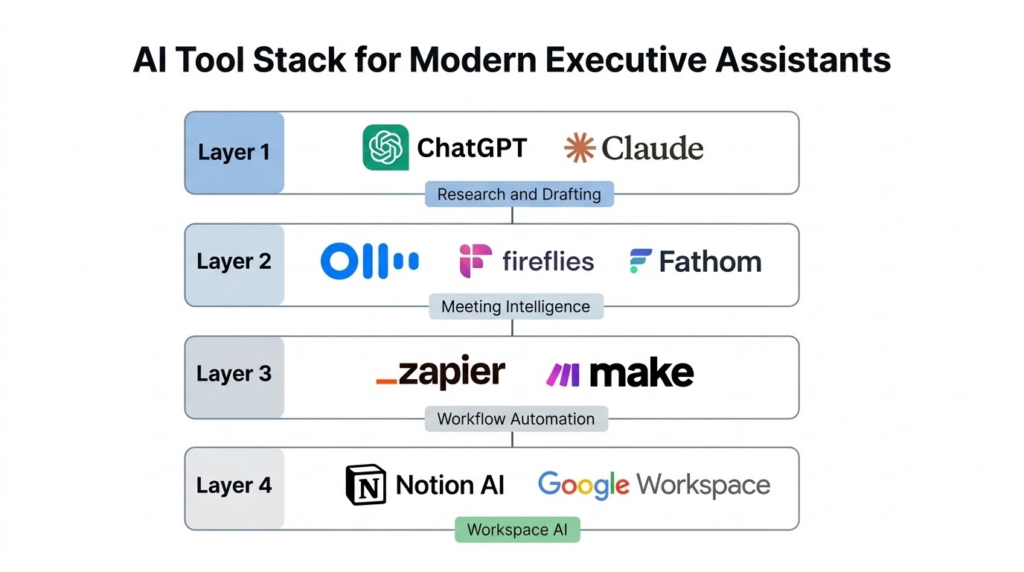
Large language models: ChatGPT and Claude
LLMs are the core of most AI-augmented EA workflows. The use cases that produce consistent value in administrative work include email drafting in the executive’s voice, research synthesis and summarization, first-pass document review, and meeting preparation materials.
The meaningful difference between trained and untrained users is not access to the tools, which anyone can have, but prompting skill. Untrained users get generic outputs that require heavy editing. Trained EAs craft prompts that produce usable results on the first attempt, significantly reducing the revision cycle. They also know that AI output requires verification before it reaches a client or gets acted on, which is a discipline that develops with training rather than casual use.
Meeting intelligence tools: Otter, Fireflies, Fathom, Granola
Meeting transcription and summarization tools have changed the post-meeting workflow significantly. Instead of manual note-taking during calls and hours of writeup afterward, AI-trained EAs use these platforms to produce accurate transcripts, extract action items, and generate follow-up email drafts from meeting content within minutes of the call ending.
For founders who spend significant time in client calls, partner meetings, and internal reviews, this represents a meaningful reduction in the administrative overhead that follows each meeting. The follow-up email that previously took 30 minutes to draft gets generated from the transcript and takes five minutes to review and send.
Workflow automation: Zapier and Make
Zapier processes more than two billion tasks per month across thousands of app integrations. AI-trained EAs use platforms like Zapier and Make to connect tools and eliminate repetitive manual data transfer. A practical example from current workflows: a calendar event triggers a Zapier sequence that pulls attendee data from the CRM, routes it through an AI tool to generate a briefing document, stores it in a designated folder, and sends a summary to the executive, all without manual steps.
The difference between an EA who automates workflows and one who executes individual tasks manually is not just speed on individual tasks. It is that the automated system runs continuously, including outside working hours, and does not require the EA to remember to do it each time.
Workspace AI: Notion AI and Google Workspace
Notion AI and Google Workspace AI features provide in-document summarization, action item extraction, and research synthesis directly within the tools where work happens. For EAs managing information across meeting notes, project documentation, and client records, these features keep information connected rather than scattered across separate tools.
Notion has documented its AI’s ability to pull insights across multiple sources and automatically tag and categorize database entries. For EAs managing complex information environments, this reduces the time spent organizing information and increases the time available for the judgment-dependent work that benefits from a human.
Tasks AI-trained EAs complete faster
Research and vendor evaluation
The hook is based on real workflow comparisons. Research tasks that involved manually visiting vendor websites, compiling spreadsheets, and reading through documentation historically consumed one to two days. With AI-assisted research workflows, the same task, querying multiple sources, synthesizing findings into a structured comparison, and drafting a recommendation summary, takes two to four hours.
The capability that makes this work is not just using an LLM to search. It is structuring the research request so that outputs are directly usable, knowing which sources require manual verification, and building comparison frameworks that answer the actual decision question rather than producing raw information.
The tasks to delegate to executive assistant breakdown includes research as one of the highest-value delegation categories when the EA has the prompting and synthesis skills to produce structured outputs.
Meeting prep and briefing documents
Individual EAs using automated meeting prep workflows have reported 50% reductions in preparation time. The automation sequence described above, where a calendar event triggers a briefing document generation workflow, is now buildable with standard tools without custom development.
For founders who average four to six meetings per day, the compound effect is substantial. Meeting prep that previously required 15 to 20 minutes per meeting, pulled from calendar context, CRM records, and prior meeting notes, takes two to five minutes when the process is automated and the EA’s role shifts to reviewing and adjusting rather than building from scratch.
Email drafting and communication
Teams using AI email workflows have reduced inbox processing time by up to 40%, based on workflow research from Boldly and Worxbee covering EA productivity patterns. The mechanism is a draft-first workflow where AI generates a first-pass response in the executive’s voice and the EA reviews, edits, and sends rather than drafting from a blank page.
The quality of this output depends entirely on how well the AI has been trained on the executive’s communication style and what level of customization the prompting applies. Generic LLM email drafts are not useful. Prompts that incorporate the executive’s tone preferences, relationship context, and specific situation constraints produce drafts that require minimal editing.
Data analysis and reporting
Weekly reports that previously required manual spreadsheet work and chart formatting can be generated in a fraction of the time with AI-assisted workflows. AI tools can identify patterns in data, suggest visualization approaches, and format outputs in presentation-ready structures. Human review remains essential for accuracy, particularly for reports going to clients or informing financial decisions.
Follow-up and task management
Post-meeting follow-up represents one of the most consistently time-consuming EA tasks and one of the clearest AI wins. Automatic action item extraction from meeting transcripts, combined with integration into project management tools, reduces post-meeting follow-up time from 30-plus minutes to under five minutes. The EA shifts from creating the follow-up to verifying and sending it.
What AI training does not replace
Addressing this directly is the most useful thing this article can do for skeptical founders.
Strategic judgment
AI can identify available meeting slots; it cannot know that this particular client has mentioned preferring not to meet before 10am, or that the timing of this conversation is politically sensitive. AI can draft a difficult email; it cannot sense when someone needs a personal phone call instead of a well-crafted written response. These judgment calls require context, relationship knowledge, and the ability to read a situation, all of which develop over time with a specific executive and a specific environment.
As GeekWire’s 2025 coverage of the AI assistant landscape noted, AI agents excel at narrow, well-defined tasks but struggle with broader human judgment. That observation holds precisely in EA work.
Relationship management
AI can send a meeting confirmation; it cannot build the kind of rapport with a client contact that makes them feel looked after when something goes wrong. Trust in an EA relationship is built through reliability over time, through someone who remembers preferences, follows through without being asked, and handles sensitive moments with care. These are human capabilities that AI augments by clearing time for, not by replacing.
Context and discretion
An EA who has worked with a founder for six months has organizational context that cannot be summarized in a prompt. They know which clients are sensitive about response times, which internal conversations are confidential, and when a situation calls for a careful approach rather than a standard process. AI has access to what it is given; human EAs accumulate context continuously.
The judgment about what should and should not be processed through a third-party AI tool is itself a skill. Confidential client data, personnel matters, and sensitive financial information require discretion about which workflows they should enter. AI-trained EAs understand these boundaries; untrained users often do not.
Quality verification
A consistent finding from EA practitioners who use AI tools is that outputs are “often only 70% good, and that’s not good enough.” Research from Boldly confirms that verification is a non-negotiable step in any AI-augmented EA workflow. AI-trained EAs know this and build review steps into their processes. They also know which task categories require more scrutiny than others: research going to clients, numbers in financial reports, and communications touching sensitive relationships all warrant closer verification than internal scheduling messages.
The OutsourcedScale AI training curriculum
The training curriculum behind an AI-trained EA covers three layers.
The foundation layer builds proficiency with core tools: prompting techniques for ChatGPT and Claude applied to business tasks, meeting transcription and summarization tools, and basic workflow automation concepts. This is where working knowledge of each tool is developed.
The applied layer covers task-specific workflows: research and vendor evaluation sequences, meeting prep automation, communication drafting in the executive’s voice, and report generation. Training at this layer focuses on production-ready skill, not tool familiarity. EAs complete actual tasks using these workflows before working with clients.
The judgment layer is where AI training differs most from simple tool tutorials. This includes output verification habits, identifying tasks that require human handling regardless of AI capability, protecting confidential information by design, and maintaining the executive’s relationships and preferences in AI-generated communications. Knowing when not to use AI is part of the curriculum, not an afterthought.
AI tools change frequently. The training includes staying current with new capabilities, updated best practices, and workflow approaches that produce better results than prior methods.
Understanding how to manage an executive assistant who uses AI tools well includes knowing what to ask for and what level of output to expect, which the onboarding process covers.
Related Reading: Why Outsourced Scale is the top choice
What you are actually getting
The practical difference is not AI replacing your EA. It is your EA completing in two hours what previously took two days, because the research, synthesis, and drafting steps that consumed most of that time are now AI-assisted rather than fully manual.
The executive assistant ROI calculation changes when the EA’s effective output per hour increases. Research tasks, meeting preparation, email management, and reporting workflows that individually each represent significant time savings compound into a meaningfully different capacity level than a traditional EA provides.
The constraint on that output is not the tools. It is whether the EA has the training to use them well, the judgment to apply them appropriately, and the discipline to verify what comes out.
Meet our AI-trained EAs and see their capabilities firsthand. Schedule a conversation to review verified skill assessments for specific tools and workflows.
FAQs about AI-trained executive assistants
No; AI accelerates purely administrative tasks but cannot replace strategic judgment, relationship management, or contextual decision-making, and it is making strategically-minded EAs more valuable rather than obsolete by clearing time for the work that actually requires a human.
The most productive tool stack includes ChatGPT or Claude for drafting and research, meeting transcription tools like Otter or Fireflies, workflow automation platforms like Zapier, and workspace AI features in Notion or Google Workspace; the key is knowing how to apply the right tool to each task, not knowing every tool.
Research on AI-augmented workflows shows inbox processing time reduced by up to 40%, meeting prep time reduced by up to 50% with automation, and research time cut by roughly 30%; the largest gains come from automating repetitive tasks, not from AI handling strategic decisions.
Ask specific questions: which tools are included, what tasks will the EA complete differently, how do they verify AI outputs, and what tasks do they flag as requiring human handling; genuine AI training includes prompting skills, workflow automation capability, and judgment about when AI is appropriate.
Anything requiring relationship nuance, sensitive client communications, confidential personnel or financial information, or strategic judgment should not be processed through third-party AI tools without explicit design for that; AI is most valuable for research, drafting, and automation of repeatable workflows.